
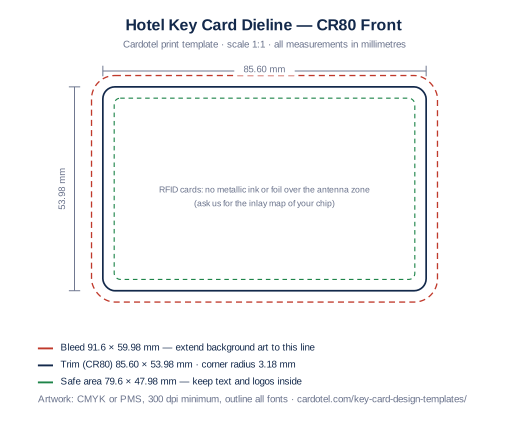
CR80 dieline — front
Trim, bleed and safe-area guides for the printed face. Includes the RFID antenna clearance note.
Free download
Download CR80 reference layouts with bleed, safe area and a magstripe zone marked. Add your artwork, then confirm the final layout for your card material and lock system. No email or inquiry is needed to download.
Have an artwork draft? Request a printing quote or plan a physical sample. Read the design checklist before preparing your file.
Trim, bleed and safe-area guides for the printed face. Includes the RFID antenna clearance note.
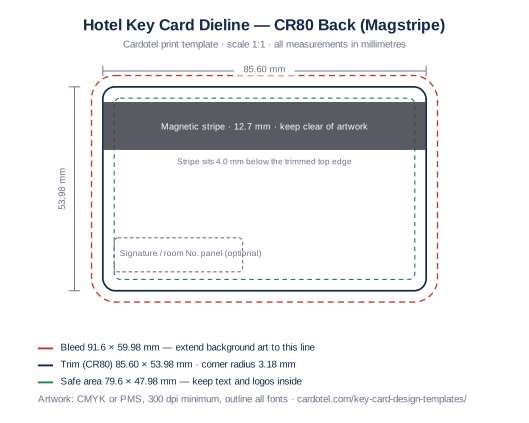
Back-of-card layout with the 12.7 mm magnetic stripe zone and optional signature panel marked.
| Reference trim size (CR80) | 85.60 × 53.98 mm |
|---|---|
| Bleed | +3 mm each side → 91.60 × 59.98 mm |
| Safe area | 79.60 × 47.98 mm (3 mm inside trim) |
| Corner radius | 3.18 mm |
| Magnetic stripe zone (back) | 12.7 mm tall, 4.0 mm below top edge |
| Resolution / colour | 300 dpi minimum · CMYK or PMS spot colours |
| Finished thickness | Specify with the material and encoder requirements; not set by this artwork template |
These are artwork guides, not an approved production specification. Confirm stripe placement, card thickness and RFID inlay requirements for the selected card. If you want metallic ink or foil, include that finish in your inquiry and agree a sample test before production.
Use these PDF/SVG reference dielines to prepare artwork at actual size. Confirm your printer’s required export format, bleed and finishing clearances before final approval. Keep guide lines on a separate non-printing layer.
Include artwork review in your quote request. Send the file to sales@cardotel.com with the same name or company used in your inquiry. The review scope, any artwork work and timing will be confirmed for your project.
They are a starting layout for CR80 cards. Confirm the finished dimensions, thickness, coating and printing or engraving requirements for your chosen material. A screen proof does not confirm the material or RFID performance; agree a physical sample plan.
Export a PDF at actual size and keep your original editable file. Include the file format and artwork status in your inquiry so any adjustments can be scoped before production. A preview image alone may not be suitable for final printing.